


 Pakistan (Head Office):
  Australia:
  USA (Virtual Office):
Every business has repetitive work.
Employees copy information between spreadsheets, respond to routine emails, update CRM records, process invoices, schedule meetings, send reminders, create reports, and move information from one application to another. None of these tasks may seem significant on their own, but when they happen hundreds or thousands of times each month, they can consume a surprising amount of employee time.
This is where workflow automation software can make a difference.
Instead of relying on employees to manually complete every step, businesses can use automation to connect applications, trigger actions, route information, send notifications, and manage repeatable processes automatically. For U.S. companies dealing with growing workloads and increasingly complex technology environments, workflow automation can become an important part of improving operational efficiency.
The shift is already underway. According to the U.S. Census Bureau’s Business Trends and Outlook Survey, AI use among U.S. businesses remained between 17% and 20% from December 2025 through May 2026. The same data showed that 37% of firms with at least 250 employees reported using AI in their business operations.
What Is Workflow Automation Software?
Workflow automation software helps businesses automate a sequence of tasks based on predefined triggers, rules, conditions, and actions.
For example, imagine that someone submits a contact form on your website. Without automation, an employee might need to check the form, copy the customer’s information into a CRM, assign the lead to a salesperson, send a confirmation email, and create a follow-up reminder.
An automated workflow can handle much of this process automatically:
- Website form receives a new lead
- Customer information is added to the CRM
- Lead is assigned to the appropriate salesperson
- Confirmation email is sent
- Follow-up task is created
- Sales team receives a notification
The employee still handles the important part: communicating with the prospect and building the relationship. The software simply removes the repetitive administrative steps surrounding that interaction.
Workflow Automation vs. Task Automation
These terms are often used interchangeably, but there is a useful distinction. Task automation focuses on automating a single repetitive activity. Sending an automatic email reminder is one example. Workflow automation connects several automated actions into a complete business process.
Think of task automation as automating one machine in a factory. Workflow automation connects the machines so the entire production line can operate with less manual intervention. For example, automatically sending an invoice reminder is a task. Creating an invoice, sending it for approval, delivering it to the customer, tracking its payment status, and notifying the finance team when it becomes overdue is a workflow.
This distinction matters because businesses usually don’t need to automate every individual action separately. They need to identify complete processes that contain repetitive steps and improve the flow from beginning to end.
Why U.S. Businesses Are Investing in Automation
American companies operate across increasingly complicated technology environments. A single organization may use separate platforms for CRM, accounting, HR, email marketing, project management, customer support, analytics, and document management.
The problem is that these systems do not always communicate automatically. Employees often become the connection between applications. Someone downloads a spreadsheet from one system, edits it, uploads it somewhere else, emails another employee, waits for approval, and then updates another database.
That is a lot of manual coordination. The Census Bureau’s 2026 analysis shows that AI adoption varies significantly by business size and industry. As of May 3, 2026, 37% of firms with at least 250 employees reported using AI, compared with less than 20% among firms with four or fewer employees.
The opportunity, therefore, isn’t limited to large enterprises. Smaller companies can also identify repetitive processes and automate them gradually.
How Workflow Automation Eliminates Repetitive Business Tasks
The simplest way to understand workflow automation is to look at what employees repeatedly do. If a process happens frequently, follows predictable rules, and does not require human judgment at every step, it may be a good candidate for automation.
1. Automating Data Entry
Manual data entry is one of the clearest automation opportunities. A business might receive customer information through a website, email, PDF, or online form. Employees then enter that information into a CRM, spreadsheet, accounting platform, or internal database.
Automation can transfer information between connected systems without requiring employees to copy and paste the same data repeatedly. This can help reduce repetitive administrative work while creating more consistent data across business applications.
2. Automating Emails and Notifications
Employees don’t need to manually send every routine message.
Businesses can automate:
- Appointment confirmations
- Customer notifications
- Payment reminders
- Internal alerts
- Lead follow-ups
- Task reminders
- Approval notifications
- Status updates
For example, when an invoice becomes overdue, an automated workflow can notify the finance team and trigger an appropriate customer communication.
3. Automating Approvals
Approval processes can become slow when every request depends on email chains. Workflow automation can route requests to the right person according to predefined rules.
For example:
Employee submits expense → Manager receives request → Manager approves → Finance is notified → Expense record is updated
The workflow provides structure without requiring employees to manually coordinate each step.
How DevVibe Helps Businesses Automate Repetitive Work
For businesses that want to move beyond basic automation tools, DevVibe helps design and build AI-powered workflow automation solutions around real business processes. Instead of forcing a company to change the way it works to fit a generic platform, DevVibe can analyze existing workflows, identify repetitive bottlenecks, connect business applications, and develop automation that fits the organization’s specific requirements. From AI-driven workflows and process optimization to custom software integrations, the goal is to help teams reduce manual work while keeping people involved where human judgment matters.
Key Benefits of Workflow Automation
When implemented correctly, workflow automation can improve several areas of business operations.
| Benefit | How Automation Helps |
|---|---|
| Less repetitive work | Employees spend less time on manual administration |
| Faster processes | Tasks can start immediately after predefined triggers |
| Fewer manual errors | Data can move between connected systems automatically |
| Better consistency | Standard workflows follow defined rules |
| Improved visibility | Teams can track workflow status and bottlenecks |
| Faster response | Notifications and actions can happen automatically |
| Easier scaling | Businesses can process more work without increasing every administrative task |
The biggest benefit isn’t necessarily speed. Consistency is just as important.
When employees manually perform the same process in different ways, the outcome can vary. Automated workflows can establish a standard process while still allowing people to handle exceptions.
Common Business Processes You Can Automate
Workflow automation can be applied across almost every department.
1- Sales and Lead Management
Sales teams spend valuable time updating CRM records, assigning leads, sending follow-ups, and creating reminders. Automation can capture a new lead, enrich or categorize the information, assign it to the appropriate representative, and create follow-up activities. That allows salespeople to spend more time talking to prospects instead of maintaining administrative records.
2- Finance and Accounting
Finance teams regularly process invoices, expense reports, purchase requests, payment reminders, and approvals. A workflow can automatically route documents to the correct person, trigger notifications, update records, and identify exceptions that require human attention. The goal isn’t to remove financial oversight. It is to reduce unnecessary manual coordination.
3- Human Resources
Employee onboarding contains many repetitive steps. Once a new employee is hired, HR may need to:
- Collect employee information
- Request documents
- Create accounts
- Notify IT
- Assign training
- Schedule orientation
- Track onboarding progress
Workflow automation can connect these activities so that one event triggers the next appropriate action.
4- Customer Support
Customer service teams can automate ticket creation, routing, acknowledgments, escalation notifications, and status updates. AI can also help classify incoming requests, summarize conversations, and identify the appropriate department before a support representative takes over. This creates a useful balance between automation and human support.
5- AI Is Making Workflow Automation More Powerful
Traditional automation follows rules. AI-powered automation can also interpret information. That difference is important.
Consider an email inbox receiving hundreds of customer requests. A traditional workflow might route messages according to keywords. An AI-powered workflow can potentially analyze the message, determine its intent, summarize the request, identify relevant information, and send it to the appropriate workflow.
AI can be particularly useful for processes involving:
- Document extraction
- Text classification
- Email categorization
- Customer request analysis
- Data summarization
- Content generation
- Intelligent routing
- Information extraction
However, businesses should not treat AI automation as something that can operate without oversight in every situation.
The National Institute of Standards and Technology (NIST) provides an AI Risk Management Framework designed to help organizations incorporate trustworthiness considerations into the design, development, deployment, and use of AI systems. For companies implementing AI-powered workflows, NIST’s framework can be a useful reference when considering issues such as reliability, security, transparency, privacy, and risk management.
How to Choose Workflow Automation Software
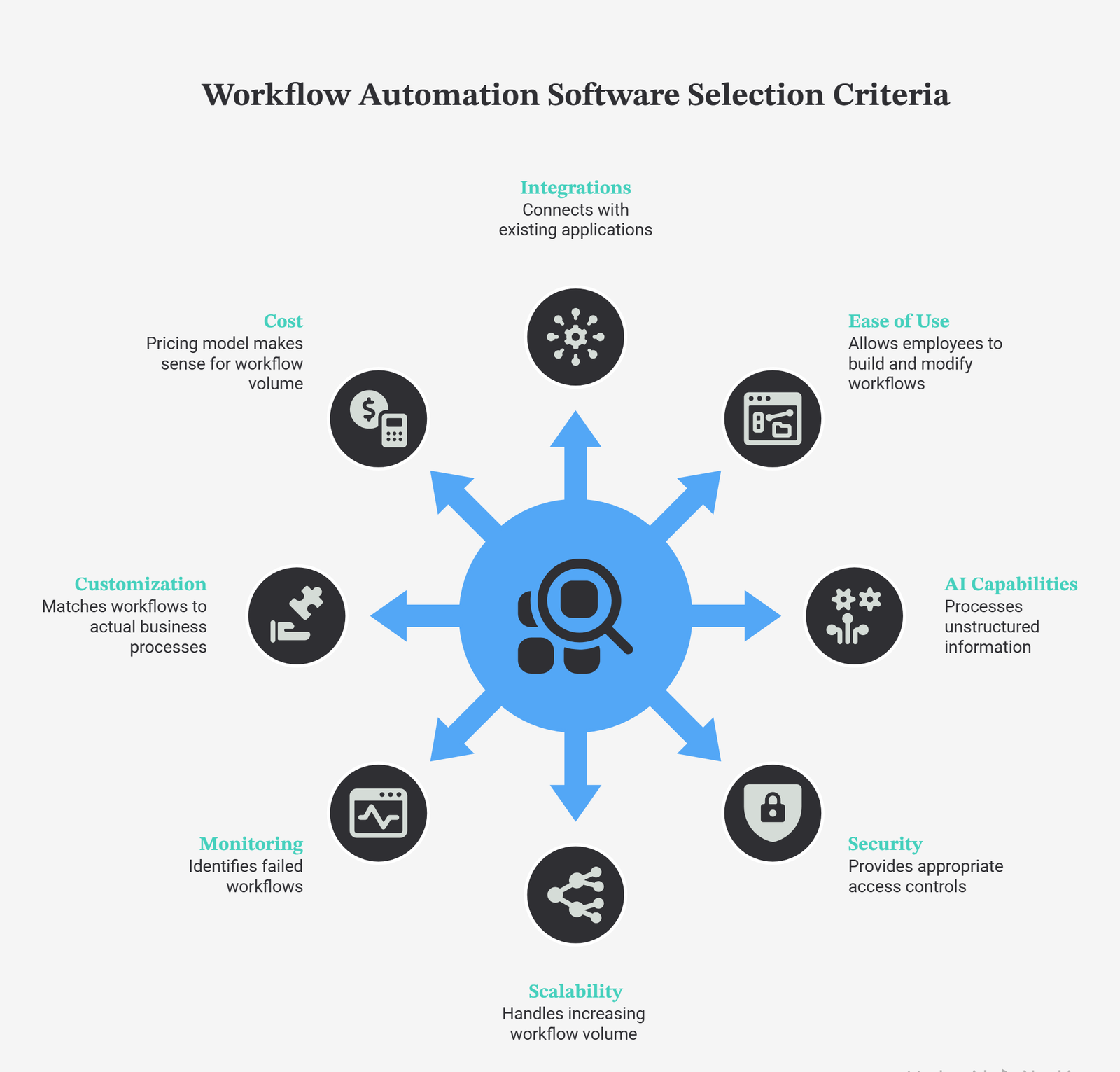
Choosing an automation platform should begin with your business processes, not the software’s feature list. Before selecting a platform, consider:
- Integrations: Does it connect with your existing applications?
- Ease of use: Can employees build or modify workflows?
- AI capabilities: Can it process unstructured information?
- Security: Does it provide appropriate access controls?
- Scalability: Can it handle increasing workflow volume?
- Monitoring: Can your team identify failed workflows?
- Customization: Can workflows match your actual business processes?
- Cost: Does the pricing model make sense for your workflow volume?
The market includes simple no-code automation tools as well as enterprise platforms designed for complex business processes. Current 2026 comparisons show major differences between platforms based on integrations, workflow complexity, AI features, technical requirements, and scalability.
How to Start Automating Repetitive Tasks
Don’t try to automate your entire company on day one. Start with one process.
Look for a task that:
- Happens frequently.
- Has predictable steps.
- Requires significant manual effort.
- Uses information that already exists digitally.
- Does not require human judgment at every stage.
- Has a clear business outcome.
For example:
Website lead → CRM → Assignment → Email → Notification → Follow-up
Once the workflow is working reliably, you can move to another process. This gradual approach makes automation easier to test and allows employees to identify exceptions before the system becomes responsible for a larger part of the operation.
Need Help Building an AI-Powered Workflow?
Choosing an automation tool is only the first step. The bigger challenge is deciding what should be automated, how different systems should communicate, and where AI can actually improve the workflow. That’s where a custom automation approach can make sense for businesses with complex processes, multiple software platforms, or workflows that cannot be handled effectively by simple plug-and-play automation tools.
DevVibe works with businesses to identify workflow bottlenecks, optimize business processes, integrate software systems, and develop AI-powered automation solutions. The process can begin with an assessment of your existing workflows and technology stack, followed by recommendations for automation opportunities, integrations, and implementation. DevVibe’s consulting and scalability service specifically includes technical assessments, process optimization, workflow automation, AI adoption, and technology strategy.
Whether you’re looking to automate lead management, customer support, document processing, internal approvals, reporting, or another repetitive business process, the first step is understanding where automation can create measurable value.
The Future of Business Workflow Automation
Workflow automation is moving from simple rule-based triggers toward more intelligent systems that combine automation, integrations, AI, analytics, and human decision-making. The next stage isn’t necessarily about removing humans from workflows. Instead, businesses can use automation to create a division of labor between software and employees. Software can handle repetitive, predictable, high-volume activities. People can focus on decisions, relationships, creativity, strategy, and situations where context matters. That distinction will become increasingly important as more U.S. businesses adopt AI and automation technologies.

Conclusion
Workflow automation software can help U.S. businesses eliminate repetitive tasks, connect disconnected systems, reduce manual administration, and create more consistent business processes. The strongest automation opportunities are usually hiding in ordinary activities: copying data, sending reminders, routing requests, updating records, processing documents, and waiting for approvals.
AI is expanding what automation can handle by allowing workflows to work with information that previously required human interpretation. At the same time, organizations should approach AI-powered automation with appropriate security, governance, and risk-management practices. NIST’s AI Risk Management Framework provides one authoritative starting point for organizations evaluating responsible AI implementation.
For a business considering automation in 2026, the best place to start isn’t with the question, “What can we automate?”
A better question is:
“Which repetitive process is slowing our people down the most?”
Find that process, map it, automate the appropriate steps, measure the result, and then expand from there.
Automate the Work Your Team Repeats Every Day
Still relying on manual data entry, repetitive emails, spreadsheets, approvals, or disconnected business systems?
DevVibe can help you identify automation opportunities and build AI-powered workflows around your business processes.
Book an AI Automation Consultation
FAQs
1.What is workflow automation?
Workflow automation is the use of software to automatically execute repetitive business processes according to defined triggers, rules, conditions, and actions.
2.What repetitive business tasks can be automated?
Common examples include data entry, lead assignment, email notifications, invoice processing, approvals, employee onboarding, customer support routing, reporting, and document processing.
3.Is workflow automation useful for small businesses?
Yes. Small businesses can automate repetitive administrative processes without needing a large technical team. Starting with one simple workflow can help demonstrate value before expanding automation across the organization.
4.What is AI workflow automation?
AI workflow automation combines traditional workflow automation with artificial intelligence. AI can help analyze documents, classify information, summarize text, understand customer requests, and make recommendations within a broader automated process.
5.Is workflow automation secure?
Security depends on the platform, configuration, integrations, permissions, data handling, and the type of workflow being automated. Businesses using AI should also consider governance and risk-management practices. NIST’s AI Risk Management Framework is a useful U.S. government resource for organizations evaluating AI-related risks.

Hamza is a technology-focused writer specializing in AI development, LLMs, software solutions, and workflow automation. He shares practical insights into how emerging technologies can solve complex business challenges.